
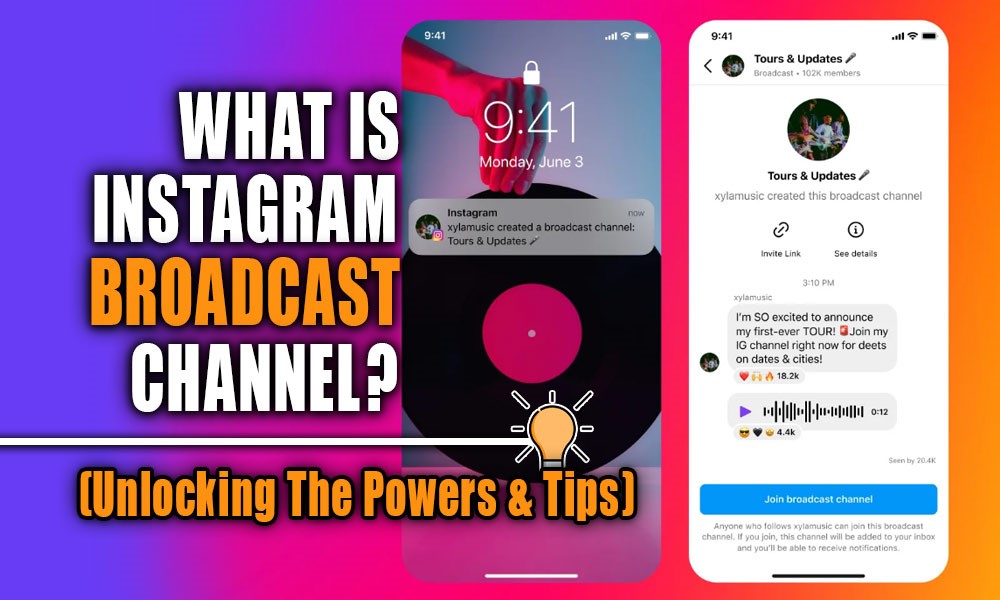
Think about being able to send messages and content on Instagram that only reach your true, engaged followers. Not just anyone who’s following you, but those who are genuinely interested in you and your content. That’s the magic of Instagram community channel.
But do you actually know how to leverage this feature to your advantage? You might think it’s just for influencers and big brands, but what if I told you there’s a hidden key in your hands right now that could change the game entirely?
Are you ready to find out how this feature can completely flip your success equation? Keep reading the “What is an Instagram broadcast channel?”, because you might be about to uncover a major secret you’ve been missing!
What Is a Broadcast Channel on Instagram?
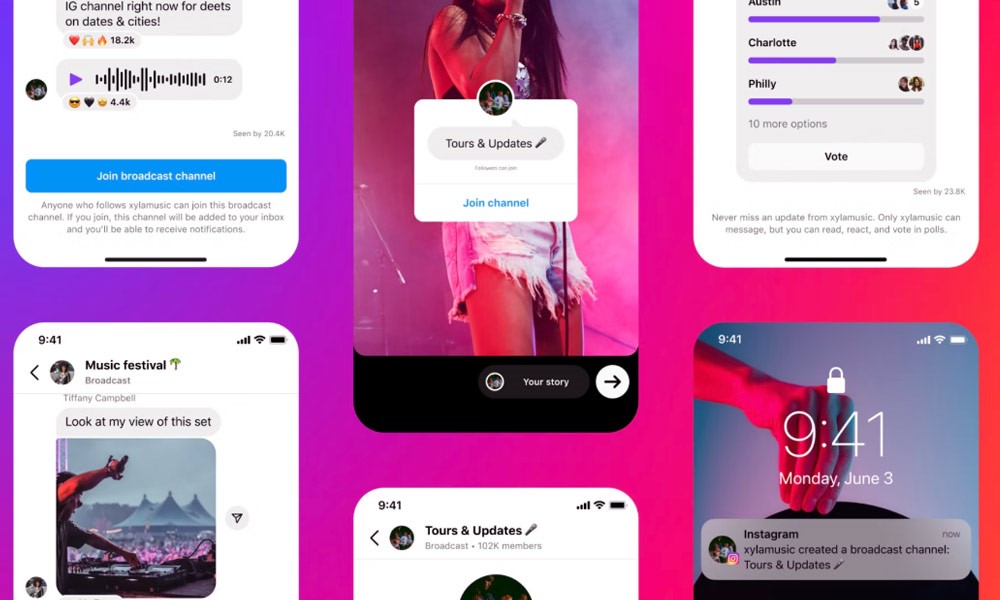
An IG Broadcast Channel is a new feature that lets you send updates, content, and exclusive news directly to your audience, without the usual distractions of comment sections or group messages.
It’s built on a one-to-many messaging format, meaning only the channel creator can send messages, while subscribers can view and react, but not reply. This makes it a powerful communication tool that lives inside your Instagram DMs, where you can create a focused space to engage your top fans or customers.
The channel can include text updates, videos, voice messages, images, or even interactive content like polls (shared through stories). Whether you’re a content creator, business, or brand, this feature gives you a fresh and direct way to reach people who want to hear from you. Consider that this is more than just engagement; it’s also one of the smartest ways to increase Instagram followers in 2025 while keeping your community loyal.
You can treat it like a mini-newsroom, a behind-the-scenes feed, or even a VIP area for your most loyal followers. And just like when you go live on Instagram, broadcast channels allow you to connect in real time with your audience, but in a more controlled way.
So, if you’re asking yourself, What is Instagram Broadcast Channel, just think of it as your personal chat channel, fully controlled by you, built right into Instagram, and designed to keep your community close and engaged.
How to Find & Engage with Broadcast Channels?
Getting involved with Broadcast Channels as a follower is super easy. You just need to know where to look and how to engage properly to get the most out of the experience.
How to Find Instagram Broadcast Channels?
- Profile Button: Check the creator’s profile. If they’ve created a channel, you’ll often see a “Join broadcast channel” button in their bio or story highlights.
- Stories & Posts: Creators usually promote their channels through stories or pinned posts, often with direct links.
- Cross-Promotion: Many creators share their Broadcast Channel links on other platforms like Twitter, Telegram, or YouTube.
- Instagram Discovery: Instagram may recommend popular or trending channels to you through Instagram engagement features.
How to Engage with Broadcast Channels?
- React to Messages: While you can’t reply in the channel, you can tap and react to individual messages using emojis.
- Watch for Polls or Q&As: Some creators use interactive stories to continue the conversation.
- Share the Channel: If you find the content valuable, you can share the invite link with friends who might enjoy it too.
- Stay Active: The more you engage, the more likely Instagram is to show you future content from that creator.
Broadcast Channels are changing the way we interact on Instagram by creating more focused and intentional spaces for communication. They’re not just another inbox; they’re part of the larger wave of tools like Instagram messaging tools that help strengthen the creator-fan relationship.
How to Set Up an Instagram Broadcast Channel?
If you’re a creator or business and want to start your own Broadcast Channel, the setup is quick and simple, but there are a few important steps to follow.
- Switch to a Creator or Business Account: Go to your Instagram settings and change your account type. Only Instagram creator tools and business accounts have access to Broadcast Channels.
- Open Instagram DMs: Tap the message icon in the top-right corner of your home feed. You’ll see an option at the top that says “Create broadcast channel.”
- Set Up Your Channel: Enter a channel name, write a welcome message, and choose whether the channel is public or limited to your followers.
- Invite Subscribers: Share the channel link in your stories, add it to your bio, and send it through private DMs or share it externally.
- Start Posting: Begin sending valuable content. You can post: text messages, photos or videos, voice notes, and important updates and announcements on Instagram.
- Track Performance: Keep an eye on your channel subscribers count, message views, and reactions to understand what content resonates most.
This is one of the best answers to using Instagram news channel. Just follow these steps, keep your content clear and engaging, and you’ll be building a loyal audience in no time.

Pro Tips to level up Instagram Broadcast Channels
If you want to make your Broadcast Channel more than just another message thread, you’ll need to put a bit of strategy behind it. Here’s how to make sure your channel delivers value and keeps people coming back.
|
Broadcast Channel Tips |
Explanation |
Concrete Example |
|
Stay Consistent |
Set a regular posting schedule, like weekly updates or themed content days. This helps support your overall Instagram content strategy. |
Share behind-the-scenes videos every Monday at 6 PM in your channel to keep your audience engaged. |
|
Offer Value-First Content |
Provide content that’s exclusive to your channel, such as tutorials or sneak peeks. |
Only channel members get access to short tutorial videos not shared on your main Instagram feed. |
|
Make It Personal |
Use voice notes or casual video messages to create closeness and authenticity. |
Send a friendly, short weekly video message to your subscribers to build a personal connection. |
|
Use Your Stories for Engagement |
Encourage interaction through polls, quizzes, or Q&A in Instagram Stories since replies aren’t allowed in Broadcast Channels. |
Post a poll in your story about a topic your audience cares about, then share the results in your channel. |
|
Promote Across Platforms |
Mention your Broadcast Channel on TikTok, YouTube, Twitter, and in email newsletters to organically grow your Instagram community. |
Include your channel link and benefits in your YouTube video descriptions and shout-outs. |
|
Deliver Limited-Time Offers |
Share quick promos, discount codes, or exclusive deals only available for a short time. |
Announce a 20% discount code valid for 24 hours only in your Broadcast Channel. |
|
Track What Works |
Use Instagram analytics to monitor engagement and improve your content strategy continuously. |
Analyze which messages get the most reactions or views, and create more of those types of content. |

Benefits Of Using Instagram Broadcast Channels
There are tons of reasons why creators and businesses are excited about this new feature. Broadcast Channels on Instagram offer more than just another way to communicate; they completely change how you build and manage relationships on the platform. Why you should use Broadcast Channels:
- Clear, Controlled Messaging: Since it’s one-way messaging, your updates don’t get lost in replies or competing content. You control the message 100%.
- Higher Engagement Rates: Messages are delivered directly to people who opted in. These are your core fans, meaning engagement is naturally higher; this enhances your social media engagement strategy effortlessly.
- Boosted Reach Without Ads: Messages go straight into your followers’ DMs. No need to fight with the algorithm or pay for visibility. That’s powerful Instagram broadcast marketing. Unlike relying on the Instagram algorithm in 2025, Broadcast Channels deliver your content directly into DMs without filters or competition.
- Perfect for Creator-to-Fan Moments: Whether you’re dropping music, announcing a product, or launching a course, it’s ideal for personalized creator-to-fan communication.
- Stronger Community Building: Creating a sense of exclusivity through channels helps you build an audience on Instagram that’s more connected and committed.
- Easy Integration with New Instagram Tools: Combine it with features like story stickers, polls, and reels for a complete content experience. These new tools keep your content fresh and interactive. Many creators even mix this with tools like Litedownloader Instagram downloaders so their followers can save reels, stories, or other updates they don’t want to miss.
- No Clutter, Just Value: Broadcast Channels work like a private newsletter in your chat channel, where subscribers get curated, valuable content, without noise or spam.
If you’re serious about building deeper relationships, delivering real value, and leading your audience with clarity, Broadcast Channels are the best place to start.
In the end
Instagram message hub is a powerful tool that can transform your approach in the digital world. This feature allows you to create more personal and impactful connections with your followers, ensuring your content truly stands out.
By leveraging this capability, you can set your profile apart and elevate your engagement and growth to a whole new level. Opportunities like this don’t come around often, so don’t let this moment slip by!
Are you ready to carve out a new path for yourself on Instagram? Which feature of IG Broadcast Channels has caught your attention the most? Share your experiences with us and tell your story! Have any questions? Don’t hesitate to ask, we’re here to help you with any concerns about “What is an Instagram broadcast channel?”
Who can create a Broadcast Channel on Instagram?
Only creators and public professional accounts currently have access, typically those with a sizable following (often over 10,000).
Can followers reply or interact in Broadcast Channels?
Followers can’t reply with text but can react with emojis, vote in polls, and answer prompts if enabled.
Is there a way to monetize Instagram Broadcast Channels?
Yes, creators can make subscriber-only channels for paid followers using Instagram’s subscription feature.
Can creators schedule messages in a Broadcast Channel?
No, as of now, Instagram does not support message scheduling in Broadcast Channels.
Are Broadcast Channels visible to everyone?
No, only followers who join the channel can see its messages; it’s not a public feed feature.
If you want to know what this Instagram feature is and how it works, it’s best to start with a simple definition:
Getting to know the Instagram Broadcast option
With an Instagram Broadcast Channel, users can share live videos with their followers in real time. It facilitates genuine connection and conversation by connecting content providers with their audience directly.
Live broadcasts allow for genuine, unfiltered relationships since they are not pre-recorded or edited like typical postings or stories.
With that out of the way, let’s dive into the features and functioning of Instagram broadcast now that we are familiar with its definition:
What are the characteristics of the Instagram broadcast?
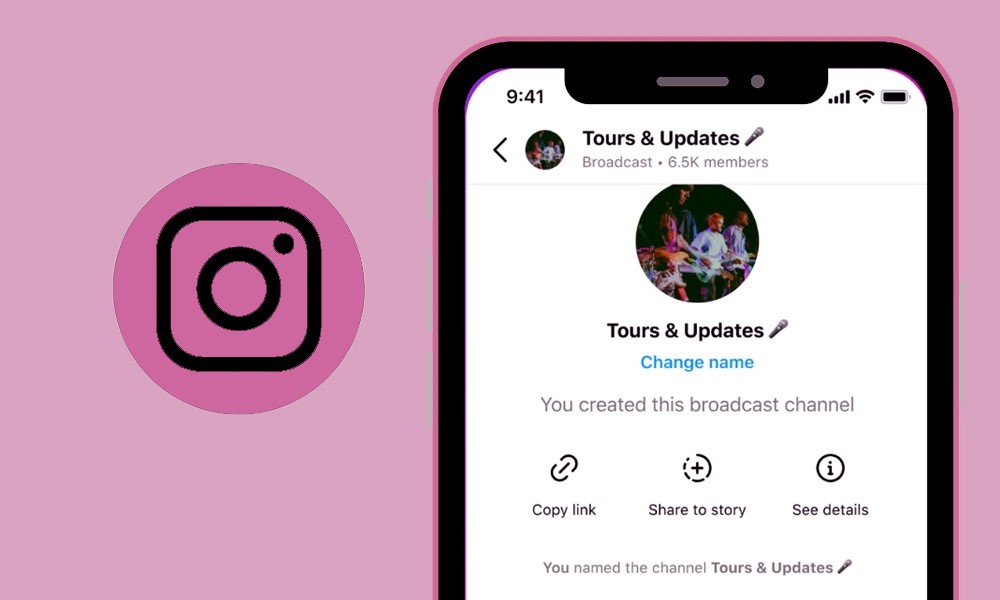
Instagram Live, or Instagram Broadcast, is unique among Instagram’s content types in a number of important ways.(Instagram’s Vanish Mode)
To continue, we listed just a few essential features of Instagram broadcast for you:
1. Tools for Engaging Viewers
The first characteristic of Instagram broadcasts is that they are tools for engaging viewers and provide a number of options for viewers to interact with your broadcasts.
Questions, polls, and real-time responses (such as likes and emoticons) are all part of this. To make it more interactive, viewers may submit questions, vote in polls, and email responses.
2. Interaction in Real Time
The next step in the list of features of Instagram Live is interaction in Real Time, Which is the other characteristic we can mention.
This feature lets users broadcast live videos to their followers in real time, as opposed to pre-recorded material. Because of this, the broadcaster and the audience can have a two-way conversation, which increases participation and input in real-time.
3. Temporary Availability
When it comes to the characteristics of Instagram Live broadcasts, temporary availability is critical and fleeting. Viewers can only access them during the live broadcast and for up to 24 hours after it ends.
The live video will automatically be deleted from Instagram after 24 hours unless the broadcaster chooses to keep it in IGTV or publishes it on their profile.
4. Discoverability
With the commencement of an Instagram live broadcast, a user can increase the possibility of viewing by notifying their followers.
Live broadcasts on Instagram might also be included under the Explore tab, where they could be discovered by more users depending on their interests and participation.
5. Guest Feature
Instagram Live users can now ask others to join their broadcast, opening the platform up to group work and discussion.
This function is very useful for conducting interviews, panel discussions, or question-and-answer sessions with visitors. It is also another feature of Live broadcasts on Instagram.
6. Instagram Live Stream Analytics
Views, comments, and interactions are just a few of the fundamental analytics and insights that users can access on the Instagram broadcast.
Users are able to comprehend the extent to which their live content was seen and influenced by these statistics.
7. Integration with Stories and IGTV
The other characteristic of Live broadcasts on Instagram is their integration with stories and IGTV. Once a live broadcast concludes, users can choose to store the video on their Instagram TV or post a replay of the program to their Instagram Stories.
This makes the information last longer and gives viewers a second chance to catch up if they missed the live broadcast.
8. Authenticity & Spontaneity
The ability to broadcast live on Instagram, unedited footage to an audience promotes spontaneity and authenticity on Instagram.
Suppose we want to discuss Instagram live broadcasts. In that case, they can capture emotions, conversations, and real-life events as they happen, as opposed to edited postings or professionally produced films.
Instagram Broadcast is excellent for interacting with followers, developing community, and sharing live experiences since it emphasizes real-time connection, audience participation, transitory availability, and authenticity.
What steps are required to set up a live broadcast on Instagram?
The process of creating a broadcast channel for Instagram Live or beginning an Instagram Live session is simple.
To get you started, we prepare the easy and practical steps for you to continue:
- Before you continue, make sure your mobile device has the Instagram app. If you don’t already have one, you should sign up for it first.
- To enter the camera interface, swipe right from any screen in the app or tap the camera icon in the upper left corner of the home screen.
- To access the “Live” mode, slide left on the camera interface until you see it. In most cases, it follows the “Normal” and “Create” alternatives.
- Before you go live, you can personalize your Instagram broadcast settings if you like. While the broadcast is underway, you have the option to allow or turn off comments, deactivate video sharing, and even activate the “Don’t disturb” mode to silence alerts. You may also add a title to offer a hint as to what’s to come.
- To begin your broadcast on Instagram, press the “Start Live Video” button. The countdown timer will tell you when your broadcast is almost ready to go live.
- After your show has gone live, viewers can begin to interact with you. Your viewers have the option to join your live broadcast, respond, ask questions, post comments, and even take part in polls.
- If you’d like to invite other users to your Instagram live broadcast, you can do so by hitting the “Add” button and then choosing their name. Anyone you ask will get an invitation to join the broadcast, and once they do, they will get a notice.
- Press the “End” button to terminate your live broadcast at any moment. Either add the replay to your story or store it on IGTV so your visitors may watch it later.
- Viewership, comments, and interaction data can be seen after your life has ended. With this information, you can assess how well your broadcast did and make adjustments for future Instagram live broadcasts.
It’s done! You have built an Instagram Live broadcast channel and are now interacting with your followers in real-time.
If you want to keep your audience interested and amused, you must continually experiment with content and interactions.
Conclusion
To sum up, Instagram’s Broadcast Channel is a fresh, innovative platform that goes beyond the limits of conventional social media by providing brands and people with a one-of-a-kind chance to engage with their audience in real time.
By embracing authenticity and using the power of live streaming, users can build community, establish real connections, and produce valuable content.
Essentially, the Instagram Broadcast Channel is more than a tool for sharing content; it’s a portal to genuine relationships and limitless opportunities in the online world.
Now, we want you to weigh in on the data we provided, share your views and opinions on the Instagram live broadcast, and let us know if we overlooked something important.