
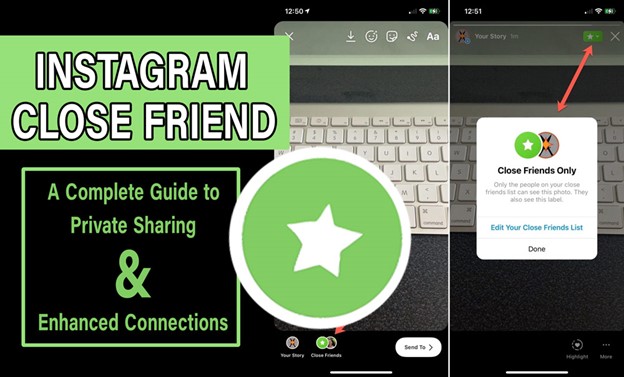
Why share every moment of your life with everyone? What if you had a magic button that let only your real, close friends in? That’s exactly where the Instagram Close Friends feature comes in, a powerful tool that lets you decide who gets to see your private stories and moments.
Have you ever noticed a green ring around someone’s Instagram Story and doubted what it means? Or maybe you’ve seen content from a creator that feels… a little too exclusive. This is what you need to know!
Ready to unlock the secret behind this feature and discover how it can make your connections deeper, more personal, and way more meaningful? Let’s dive into a whole new way of sharing, where only the people you choose truly matter!

What Is Instagram Close Friends?
Instagram Close Friends is a built-in privacy feature that allows users to create a curated list of followers who can view select Stories, posts, Reels, and even Notes, content that’s hidden from your main audience.
Instead of opening your life to every follower (or worse, the entire internet), Close Friends gives you control. When you post something to this list, only those selected can view it. The rest won’t see it, and Instagram doesn’t notify anyone about being added or removed.
There are visual cues too:
- A green circle appears around your profile picture in Stories, signalling content for Close Friends only.
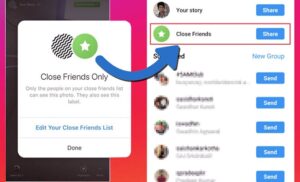
- A green star appears on posts and reels limited to your Close Friends Instagram list.
It’s a feature designed not just for privacy, but for authenticity, allowing you to be yourself with a trusted circle.
Can I save exclusive Close Friends Stories? Yes! You can download your friend’s close story content with the help of our litedownloader tool.
How to Create a Close Friends List on Instagram?
Want to know how to use the IG Close Friends feature like a pro? Start by curating your Close Friends Instagram list carefully and adjusting your Instagram Close Friends settings as needed. This way, you can enjoy creating private Instagram stories in a more secure, targeted space.
This list is private to you; no one can see who’s on it, and no notifications are sent when you add or remove someone. Here’s how to set it up:
- Open the Instagram app and go to your profile.
- Tap the menu icon in the top-right corner.
- Tap Close Friends.
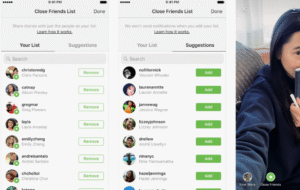
- Use the search bar to find users you want to include. Tap the circle beside their names.
- Once done, tap “Done” to save your list.
From now on, after you learned how to add/remove Close Friends, when you share content (Stories, Reels, or Posts), you’ll see the option to post it just to your Close Friends.
- Want to reset your list? Just remove everyone. Instagram won’t let you delete the list entirely, but an empty list acts like a fresh start.
- No one gets notified when they’re added or removed, so edit freely.
- Can’t remove yourself from someone else’s list? If you don’t want to see their exclusive content, you’ll have to mute their stories or block them.
- Organise your list strategically, think of close friends, loyal followers, customers, and team members. Keep it focused for better results.
Can I add anyone to my Close Friends list? Yes, but make sure they are real users and get data about how to identify fake Instagram accounts.
Why Use an Instagram Close Friends List?
Using Instagram Close Friends opens up creative and personal possibilities that standard posting simply doesn’t offer. Here’s why it’s worth using:
- Instagram privacy settings: It becomes more meaningful when you can choose who sees your most personal updates.
- Authentic connections: People on your Close Friends list feel selected, so engagement is often higher and more genuine.
- Audience segmentation: You can test different content types on different audience segments, whether it’s VIP clients, content testers, or supporters.
- Instagram audience control: You control visibility of posts, stories, and more, making your interactions more intentional.
- Elective sharing: You can share stories with select followers and tailor your content experience more than ever before.
Whether you’re using Instagram green circle indicators to share spontaneous content or building trust with followers, the Close Friends feature gives you unmatched flexibility. These Close Friends list tips can truly redefine your storytelling.
Read more: Remember, controlling who sees your content isn’t just about Close Friends. Curious about the privacy of saved posts? Read our article carefully.
Close Friends vs Public Stories vs Group DMs: What’s the Difference?
It’s important to understand how Instagram Close Friends differs from other content-sharing options like Stories or DMs. The key difference is that this feature operates as a one-way, private Instagram stories broadcast for a highly targeted audience, no threads, no clutter, just you and those you trust.
| Feature | Who Can See It? | Interaction Style | Ideal For |
|
Public Stories |
All followers or everyone (if the account is public) | One-way share + optional replies | Mass announcements, everyday updates |
|
Group DMs |
A selected group of users | Two-way conversation | Collaborative planning, private chats |
| Close Friends | Handpicked users on your list | One-way + replies | Exclusive content, brand intimacy |
How Brands and Influencers Use Instagram Close Friends Strategically?
While everyday users love Close Friends for sharing personal updates, many content creators, brands, and influencers are using it to grow engagement and build loyalty. Real-World Examples:
- Coaches & educators: Share private tutorials, bonus lessons, or real-time support only to students on your list.
- E-commerce brands: Drop secret discount codes, early-bird offers, or VIP restock alerts via Instagram stories for Close Friends.
- Content creators: Share behind-the-scenes footage, test new formats, or preview content before launch.
- Musicians or artists: Give fans an early look at upcoming songs, demos, or sketches.
By offering exclusive access through this feature, you make your audience feel valued, something a public post can rarely achieve.
Read more: How can I increase engagement with my Close Friends content? Understanding Instagram’s content suggestion system helps. See our detailed article and be aware of the tips.
Common Mistakes to Avoid When Using Instagram Close Friends
If you’re not getting great results using Instagram Close Friends, check whether you’re making these common mistakes:
- Adding too many people: Dilutes the exclusivity of your list.
- Neglecting your list: Not updating it regularly can reduce content relevance.
- Posting generic content: If your Close Friends content feels like your public content, there’s no reason to follow.
- Unclear expectations: If people don’t know what they’ll get from being on your list, they might ignore your content.
- Inconsistent use: Posting too often (or too little) can cause people to lose interest.
Pro tip: Treat your Close Friends list like a premium channel. Every post should feel like a “thank you” for being there.
Creative Ways to Monetise Your Instagram Close Friends List
Ready to turn your Close Friends Instagram list into a business tool? Here are creative strategies influencers and entrepreneurs are using:
- Paid Membership Access: Charge followers a monthly fee for exclusive content through Close Friends. For example, “A yoga instructor offering daily routines” or “A language tutor posting grammar hacks”.
- VIP Product Launches: Share behind-the-scenes product builds or launch links to Close Friends first.
- Beta Testers & Focus Groups: Want feedback before a big launch? Share teaser content with trusted followers for input.
- Host Private Q&As or Mini-Courses: Use Story stickers for questions, and post the answers in exclusive Close Friends stories. Great for consultants, educators, or creators looking to serve niche audiences.
At last, Instagram uses complex rules to decide who sees your posts and Stories. To see how these rules affect your content in 2025, read the What Is the Instagram Algorithm in 2025 post carefully.

At the end
If you’ve been overlooking it, now’s the time to rethink how you use the Instagram Close Friends feature. From exclusive content to strategic audience segmentation, it offers a new way to connect, create, and even monetize on your terms.
Learning what this feature is and how to use it gives you control, clarity, and closeness that’s hard to achieve in public posts. This is your secret weapon for real engagement.
Have you used Close Friends on Instagram yet? Try sharing one Close Friends story today and see how your audience responds. Got creative ideas for Close Friends content? Drop them below, we’d love to hear them. Need help building or monetizing your list? Reach out, we’re here to help!
How do I add or remove someone from my Close Friends list?
In the Instagram app, go to your profile > menu (three lines) > lose Friends. Then check or uncheck people to add or remove them, and tap Done.
How can I tell if I’m on someone else’s Close Friends list?
The only indication is if you view their Story (or post) and you see a green circle around their profile or a “Close Friends” label; that suggests you are in their Close Friends list.
Who can see the list of people I’ve added to my Close Friends list?
Only you can see your own Close Friends list. The people you add cannot view the full list, just the content you share with them, if applicable.
Can I share regular feed posts, Reels or live videos with only my Close Friends, or is it just for Stories?
Yes, as of recent updates, Instagram allows sharing Stories, Reels, feed posts and even Live videos exclusively with Close Friends.
Is there a limit on how many people I can add to my Close Friends list?
Instagram doesn’t publicly guarantee an exact number across all regions, but many sources cite a cap (often around 100 people) for the Close Friends list.