
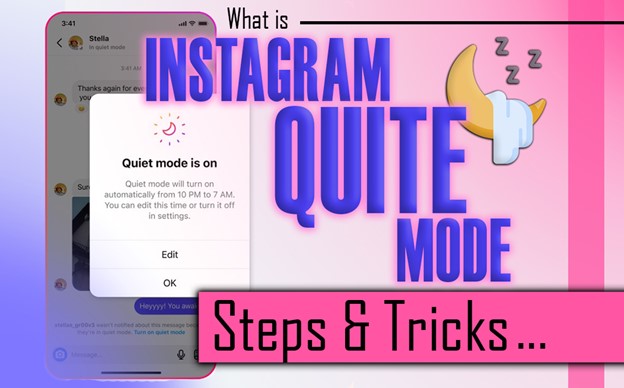
Ever feel like Instagram is silently taking over your life? The endless pings, the DMs stacking up, the mindless scrolling, every minute slipping away without you even noticing. It’s like someone is quietly hijacking your time, and you’re powerless to stop it.
But what if there was a secret escape hatch, a single switch that can silence the chaos, block the distractions, and give you back control?
Instagram Quiet Mode is that lifeline. Activate it, reclaim your focus, and finally decide when and how Instagram interrupts your day, before another precious minute disappears into the feed. Let’s go discover all details and enjoy the life!
What Is Quiet Mode on Instagram?
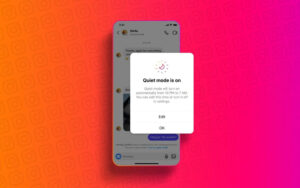
Instagram silent mode is a feature designed to help users take breaks from constant notifications. When activated, your Instagram activity status shows “In Quiet Mode,” and anyone sending Instagram direct messages receives an Instagram auto-reply. This feature mutes Instagram notifications and encourages healthier app usage habits, promoting Instagram digital well-being and user privacy.
In short, Instagram Quiet Mode, as a “Do Not Disturb” is a tool to help you and other people focus, reduce distractions, and establish clear social media digital boundaries. Whether you’re working, studying, or resting, this feature lets you control when and how Instagram interrupts your day.
Read more: Enjoy your peace in Quiet Mode, but peek behind the curtain, see how the Instagram algorithm in 2025 decides what appears in your feed.
How Does Quiet Mode Feature on Instagram Work?
When silent mode is on, several changes occur to ensure minimal distractions. This combination of notification management and automated alerts helps you maintain a healthy digital routine while protecting your user privacy.
Let’s go to have a detailed look at Instagram quiet mode function:
- Muted Notifications: You won’t receive notifications for likes, comments, new posts, or Instagram DMs.
- Auto-Reply Messages: Anyone who sends you a DM gets an automated response letting them know you’re in Quiet Mode.
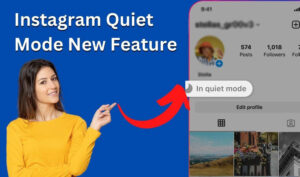
- Activity Status: Your profile displays “In Instagram Quiet Mode,” signaling others that you’re unavailable.
- Summary Report: At the end of the Quiet Mode session, Instagram provides a summary of missed notifications so you can catch up later.
While you take control with Quiet Mode, why not save your favorite Instagram posts offline? Use our litedownloader Instagram media downloader to enjoy content anytime, even during your focused hours.”
How to Enable Instagram Silent Mode?
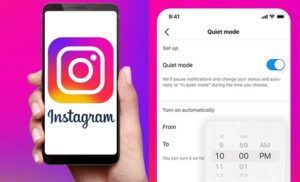
Activating silent mode on Instagram is simple and quick. You can schedule it for up to 12 hours per day, giving you flexibility to focus, rest, or take a break from notifications. Just follow a few easy steps in your Instagram settings to set it up.
- Open the Instagram app and go to your profile.
- Tap the three horizontal lines in the top right corner to access the menu.
- Select “Settings,” then navigate to “Notifications.”
- Tap on “Quiet Mode.”
- Toggle the switch to enable Quiet Mode.
- Set the start and end times for when you want Quiet Mode to activate.
Now consider that quiet mode keeps distractions away, but what about those disappearing chats? Learn how to turn off Vanish Mode on Instagram and stay in control of every message.”
Benefits of Instagram Quiet Mode
Silent mode on Instagram goes beyond convenience; it helps build healthy digital habits. This feature helps users take control of app usage habits.
Here’s what you gain while Instagram silent mode is active:
- Enhanced Focus: By silencing notifications, Silent mode allows you to concentrate on tasks without interruptions. Whether you’re working, studying, or pursuing a personal project, this feature supports a productive Instagram focus mode.
- Better Sleep: Activating Quiet Mode at night helps reduce screen time before bed. Lower exposure to notifications and bright screens contributes to improved sleep quality.
- Digital Well-Being: Quiet Mode encourages intentional app usage, helping you develop balanced app usage habits. By limiting distractions, it fosters healthier interactions with social media.
- Social Media Boundaries: Setting clear limits with Quiet Mode empowers you to have control over Instagram notifications and overall app experience. This helps prevent overuse and reduces the stress associated with constant connectivity.
No guilt, no distractions, just you, and Instagram on your terms. Imagine scrolling (or not scrolling) without feeling trapped. That’s the power waiting for you. So have look at How to Increase Instagram Followers in 2025?!
How to Turn Off the Instagram Quiet Mode Feature?
Turning off Quiet Mode on Instagram is simple and quick; you can also turn off notifications directly when the mode is active.
- Go to your profile > Instagram settings > Notifications > Quiet Mode, toggle it off.
Silent Mode and Teen Time Management on Instagram
Instagram also supports parental controls and teen digital time management to promote responsible usage. These measures ensure that teens learn online boundaries and maintain digital well-being, while parents retain oversight without intruding on user privacy.
- Scheduled Quiet Mode: Automatically activates during sleep or homework hours to encourage breaks.
- Daily Limits: Teens receive reminders to step away from the app.
- Parental Controls: Parents can monitor activity, adjust settings, and guide healthy social media habits.
A Short and Creative Summary of the Important Points of the Instagram Quiet Mode
| Feature | Quick Take |
| Quiet Mode | Silence notifications, reclaim your focus. |
| Auto-Reply | DMs get a friendly “I’m in Quiet Mode” message. |
| Activity Status | Shows you’re offline without going fully invisible. |
| Schedule | Set start/end times for distraction-free hours. |
| Focus Boost | Concentrate better while working, studying, or resting. |
| Sleep Friendly | Keeps screens and notifications off at night. |
| Digital Wellness | Encourages mindful Instagram use. |
| Teen Controls | Scheduled Quiet Mode + daily limits for healthy habits. |
| Summary Report | Catch up later with all missed notifications. |
Conclusion
Instagram quiet mode helps you manage time, reduce distractions, and improve digital well-being. It mutes notifications, sends auto-reply messages, and updates your activity status. Teens benefit from parental controls, while adults can use Focus Mode to stay productive. Overall, it balances social media use with real life and protects user privacy.
Are you ready to make Instagram notifications off with silence mode? Want to improve your focus and digital well-being while using social media? Activate silent mode on Instagram today and enjoy uninterrupted time. Use Focus Mode and parental controls for smart and healthy social media habits. Do not forget to share your ideas and also your beneficial experiences with us in comment section.
Does Instagram notify people when Quiet Mode is on?
Yes. When Instagram quiet mode is active, anyone who sends you a direct message receives an auto-reply letting them know you may not respond immediately. Your activity status also shows “In Quiet Mode,” signaling your unavailability.
Can I schedule Quiet Mode automatically every day?
Absolutely. Instagram allows you to set start and end times for Quiet Mode, so it can automatically activate daily. This helps you maintain consistent screen-free periods without manually turning it on.
Will I miss important notifications while Quiet Mode is active?
No. While notifications are muted, Instagram provides a summary report at the end of the Quiet Mode period, so you can catch up on all likes, comments, and messages you received.
Can parents control Quiet Mode for teens?
Yes. Parents can use parental controls to schedule Quiet Mode for teens, set daily limits, and monitor usage. This helps guide healthy screen habits and ensures balanced time management for younger users.
Does Quiet Mode affect my Instagram activity visibility?
Yes. Your activity status updates to show “In Quiet Mode.” People can see that you’re temporarily unavailable, but they won’t know exactly when you’ll respond, preserving both privacy and focus.